
Key Takeaways
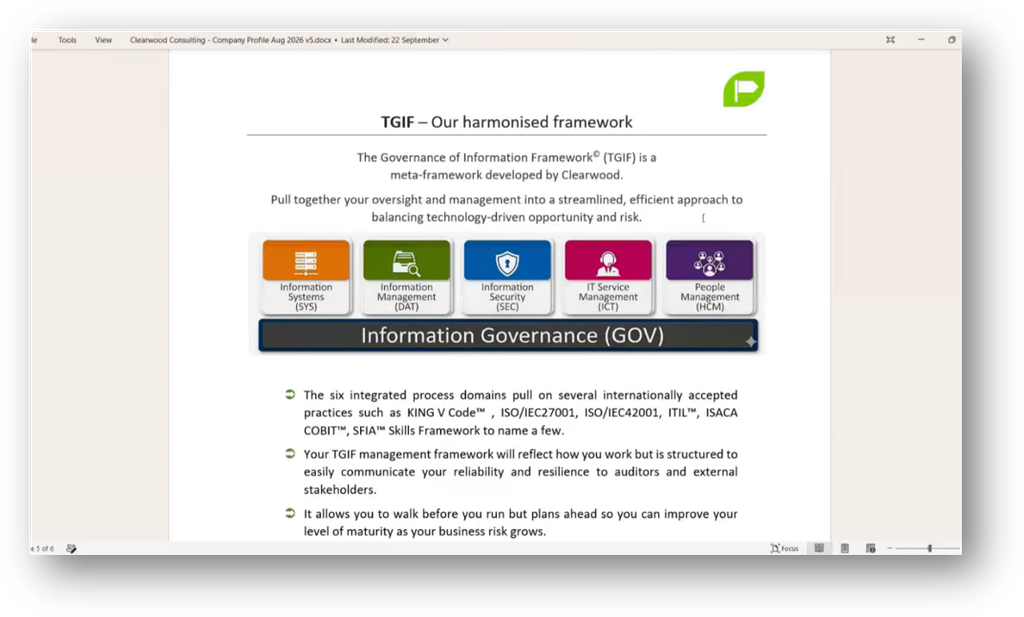
- Harmonise Systems & Processes: Integrate IT service management, security controls, data policy, and human governance into a unified framework for effective incident response.
- Maintain Physical Response Plans: Print major incident plans and display them visibly to ensure quick access during a crisis without wasting time searching digital files.
- Establish Severity Terminology: Define clear severity levels (e.g., P1 vs. P2) to authorise immediate escalation to leadership and incident response teams during incidents.
- Prepare Crisis Communications: Pre-plan messaging for internal and external stakeholders to maintain customer confidence without making premature assurances about data safety.
- MFA Bypass: Attackers can use AiTM toolkits to intercept session tokens during sign-in, granting access to accounts without the need for original credentials.
- Revoking Active Sessions: After a breach, globally revoking active session tokens and clearing local browser data matters for security.
- Deploy Passkeys & Password Managers: Adopt enterprise password managers and cryptographic Passkeys to mitigate risks associated with password reuse and enhance security against phishing attacks.
Webinar Details
Title: HACKED!? What to Do When Your Email Gets Hacked with Caroline & Ewart Mouton
Date: 2026-09-30
Presenter: Caroline & Ewart Mouton
Meetup Group: DAMA SA User Group Meeting
Write-up Author: Howard Diesel
How Does a Cybersecurity Response Framework Integrate?
An effective cybersecurity response requires a harmonised Information Governance framework that integrates IT service management, security processes, data policy, and human governance.
Organisations must pre-define incident severity classifications, such as P1 (Priority 1) or P2, to authorise immediate escalation, including waking key executives in the middle of the night.
A visual Major Incident Response Plan should be printed and physically displayed rather than buried in cloud drives, enabling rapid execution during high-stress breaches. Immediate containment steps include locking down connections, activating scenario playbooks, forcing admin password resets, verifying backups, and launching structured internal and external communications.
Key Takeaways
- Establish P1/P2 Terminology: Define clear severity language that enables off-hours escalation without hesitation.
- Physical Visibility: Display printed response plans on office walls for instant accessibility during crisis.
- Structured Communications: Separate internal operational alignment from external customer-trust messaging.
FAQ
- Why should an incident response plan be printed on paper? During an active breach, teams experience high panic and must execute immediate containment actions without digging through digital drives.
- What is the primary objective of external incident communications? External messaging aims to maintain customer trust and preserve Service Level Agreements (SLAs).

Figure 1 TGIF – Our Harmonised Framework

Figure 2 Major Incident Response Plan ( SEC-IRP)

Figure 3 External Communication

Figure 4 In the Case of a Breach: “Assume until Proven Otherwise”
How Do Attackers Compromise Email Accounts?
Email account compromise frequently manifests through indirect signals, such as contacts reporting suspicious activity via alternative communication channels like WhatsApp.
In a real-world incident involving Microsoft 365, attackers gained unauthorised access while the user was travelling and deployed hidden Outlook inbox rules that automatically deleted incoming emails. This created a blind spot where the victim received no direct bounce-backs while attackers sent fraudulent business proposals.
Remediation required auditing mail rules, resetting account access across cloud tenants, and issuing transparent notifications through unaffected communication channels.
Key Takeaways
- Watch for Hidden Rules: Attackers routinely create Outlook rules to delete incoming mail and hide compromise.
- Out-of-Band Detection: Secondary channels like WhatsApp or phone calls are key for detecting email breaches.
- Avoid Premature Claims: Public crisis statements should not claim data was unbreached until forensically verified.
FAQ
- How do phishers hide their presence inside a compromised mailbox? Attackers configure malicious inbox rules to automatically delete or divert incoming replies, preventing the account owner from noticing warnings.
How Do Phishing Attacks Target Session Tokens Today?
Phishing attacks have evolved beyond simple password harvesting and SMS multi-factor authentication (MFA) to target browser session tokens.
Early authentication relied on static credentials, which fell victim to credential harvesting forms. As organisations adopted SMS 2FA and authenticator apps, cybercriminals countered with MFA fatigue attacks (bombarding users with login approvals) and Adversary-in-the-Middle (AiTM) techniques.
A session token (or cookie) functions like a digital concert wristband: once issued after initial authentication, it allows ongoing system access without re-entering credentials. Intercepting this token enables attackers to bypass MFA completely.
Key Takeaways
- SMS 2FA Vulnerability: SMS authentication is susceptible to SIM swapping and fatigue attacks.
- Session Token Function: Tokens preserve active browser sessions to balance security with user convenience.
- MFA Bypass Mechanism: Modern phishers steal active session tokens rather than static passwords.
FAQ
- What is a session token in cloud security? A session token is a browser cookie issued upon successful login that permits ongoing access without requiring repeated password or MFA prompts.

Figure 5 Modern Phishing Attack

Figure 6 Authentication

Figure 7 Sessions and Cookies
What is An AiTM Phishing Attack Process?
Adversary-in-the-Middle (AiTM) phishing toolkits bypass security filters by routing traffic through legitimate cloud services and compromised websites
An AiTM attack begins with an email sent from a legitimate, compromised contact containing a link to a trusted cloud platform like Intuit or Cognito Forms. This initial link easily passes standard email security filters.
The victim is then redirected through a compromised WordPress site featuring a fake “human verification” check designed to block automated security crawlers. Finally, a command-and-control server proxy renders a genuine Microsoft or Google login interface, capturing credentials and live session tokens.
Key Takeaways
- Trusted Link Masking: Phishers exploit legitimate cloud platforms to bypass initial email scanners.
- Anti-Analysis Evasion: CAPTCHA and human-verification checks block automated security crawlers.
- Live Proxy Interception: AiTM toolkits intercept live authentication tokens during authentic sign-in flows.
FAQ
- How do AiTM attacks bypass multi-factor authentication? AiTM toolkits sit as a proxy between the user and the real service, capturing the active session token generated after MFA completion.

Figure 8 Session Token Stealer Email

Figure 9 Use Email Harvesting

Figure 10 Anti-detection

Figure 11 Real Cloud Platform Login
What is A “Just Culture” in Security?
Technical security controls must be supported by an organisational “Just Culture” that encourages non-punitive, early reporting of potential security incidents.
Adapted from aviation safety, a Just Culture focuses on identifying systemic vulnerabilities rather than punishing individual employees who make mistakes. Early reporting drastically minimises incident impact and containment timelines.
While human vigilance is fallible, employees should watch for key visual red flags:
- Repeated “verify you are human” challenges following email links.
- Discrepancies between the login dialogue URL and the top-level browser address bar.
Key Takeaways
- Non-Punitive Environment: Encouraging immediate mistake reporting surfaces breaches before damage escalates.
- Anti-Bot Red Flags: Multiple human-verification prompts indicate bot-evasion tactics.
- URL Inspection: Top-level browser address bars expose phishing proxies even when login boxes look real.
FAQ
- What is a “Just Culture” in cybersecurity? It is a management framework that encourages employees to report security errors immediately without fear of reprisal, treating mistakes as systemic learning opportunities.

Figure 12 Session Token Intercept

Figure 13 Identify: Just Culture

Figure 14 Identify: Human Verification After Opening Link

Figure 15 Identify: URL has Changed from Original Link
How can Responders Disrupt Active Phishing Campaigns?
Incident responders can disrupt active phishing campaigns by identifying intermediate redirection domains and submitting abuse takedown requests.
Phishing chains rely on multiple hops across compromised domains. Responders can analyse malicious URLs safely using automated tools like urlscan.io or isolated virtual machines. Personal email parameters must be redacted before submitting links to public scanners to prevent data leaks.
Caution is required when inspecting command-and-control servers: accessing harvested credentials without authorisation violates statutory cybercrime laws (such as South Africa’s Cybercrimes Act).
Key Takeaways
- Disrupt Attack Chains: Submitting abuse reports to intermediate domain registrars breaks active phishing links.
- Safe Analysis Tools: Use urlscan.io or isolated virtual machines to investigate suspicious links without risking local endpoints.
- Legal Compliance: Avoid viewing harvested credential logs on adversary servers to prevent criminal liability.
FAQ
- How can organizations break an active phishing redirection chain? By locating intermediate redirect hosts and submitting takedown notices to domain abuse contacts, breaking the attack path for all users.

Figure 16 Break the Chain

Figure 17 Respond: Do Not Access the Phishing Server

Figure 18 Respond: Cybercrimes Act 19 of 2020
How is An Email Breach Remediated Effectively?
Remediating an email breach requires invalidating active session tokens in cloud tenant portals alongside standard password resets.
Changing an account password does not terminate an attacker’s access if they hold a valid session token. Administrators must explicitly execute a global session token revocation in Microsoft 365 or Google Workspace to invalidate all active tokens.
Users must also clear local browser cookies and unregister persistent service workers that could maintain background scripts.
Key Takeaways
- Password Resets Are Incomplete: Changing passwords alone leaves existing session tokens valid.
- Global Token Revocation: Tenant admins must revoke active sessions across all devices during remediation.
- Browser Cleanup: Clear local browser data and service workers to purge remaining persistent scripts.
FAQ
- Is changing a password enough to stop an ongoing session hijack? No. Active session tokens remain valid until manually revoked by tenant administrators or naturally expire by the cloud service.

Figure 19 Recover: Revoke Session Tokens

Figure 20 Protect: Our SMME Solution
What Makes Up a Strong Cyber Defence?
A strong cyber defence combines enterprise password managers, cryptographic Passkeys, hardware security keys, and automated mail authentication protocols.
Password managers (e.g., 1Password, Bitwarden) eliminate credential reuse by generating unique, high-entropy passwords. Passkeys based on public-key cryptography render AiTM phishing ineffective because authentication is cryptographically bound to genuine domain origins.
For infrastructure protection, organisations must enforce SPF, DKIM, and DMARC mail records to prevent domain spoofing, alongside DNS filtering to block malicious IP resolution.
Key Takeaways
- Passkey Immunity: Passkeys use domain-bound public-key cryptography to completely block AiTM phishing.
- Eliminate Re-use: Enterprise password managers prevent credential stuffing across platforms.
- Mail Authentication: Enforce SPF, DKIM, and DMARC to block unauthorised domain spoofing.
FAQ
- Why are Passkeys immune to modern AiTM phishing attacks? Passkeys verify the exact domain origin before authenticating, refusing to supply cryptographic keys to fake proxy domains.

Figure 21 Table Comparing Password Options

Figure 22 Protect: DNS Filtering
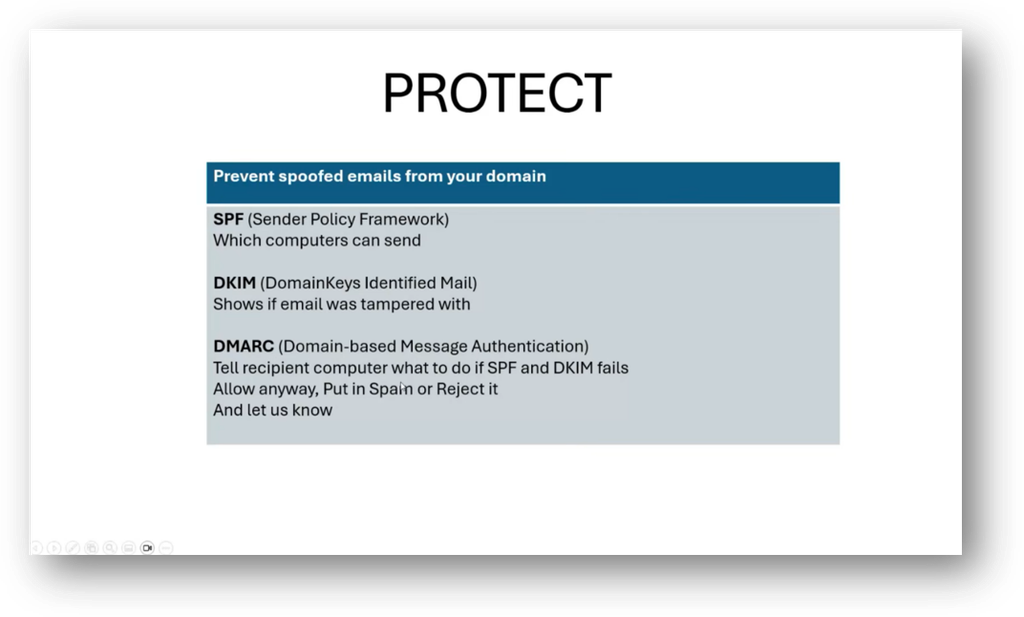
Figure 23 Protect: Prevent Spoofed Emails from Your Domain

Figure 24 Ongoing: App Consent Phishing

Figure 25 Ongoing: ClickFix Phishing

Figure 26 Protect: Solutions Already Exist Preventing Most of This
How Should Leadership Change During a Cybersecurity Breach?
Managing an active cybersecurity breach requires shifting from collaborative team dynamics to a strict command-and-control leadership structure.
During a crisis, democratic debate slows response speed. Organisations must appoint a designated Incident Commander who directs containment, assigns tasks, and enforces execution.
The Incident Commander remains separate from hands-on technical analysis and communication drafting. Collaborative evaluation resumes only after immediate threats are contained, and system stability is restored.
Key Takeaways
- Shift Leadership Styles: Adopt command-and-control directive leadership during active incident containment.
- Role Separation: Keep the Incident Commander focused on strategy rather than deep technical execution.
- Post-Incident Evaluation: Resume collaborative team debate only after returning to safe operational status.
FAQ
- What role does an Incident Commander play during a breach? An Incident Commander provides central directive leadership, executing the response plan without getting bogged down in individual technical tasks.
- Key Takeaways
- How Does a Cybersecurity Response Framework Integrate?
- How Do Attackers Compromise Email Accounts?
- How Do Phishing Attacks Target Session Tokens Today?
- What is An AiTM Phishing Attack Process?
- What is A "Just Culture" in Security?
- How can Responders Disrupt Active Phishing Campaigns?
- How is An Email Breach Remediated Effectively?
- What Makes Up a Strong Cyber Defence?
- How Should Leadership Change During a Cybersecurity Breach?


